Friday, July 17, 2009


Thursday, June 11, 2009
MP4Cam2AVI - Freeware MP4 & MOV to AVI converter
For the longest time now, I've been capturing videos of my kids and family via my Panasonic digital camera DMC-FX01. The native format is M-JPEG compressed stream wrapped in a MOV container. If you are a Windows user, you will simply need to download the free QuickTime player to view the clips on your PC.
Over the years though, the number of clips I have grew and nowadays my family gets pretty bored when we have to sit through all those raw footage from the past. Hence I decided that its about time I pick up video editing to put them out of this misery.
As luck will have it, there is a pretty nice and powerful (for newbies and amateurs of course) video editing software bundled with the XP and Vista operating system called Windows Movie Maker. But alas, it does not support the MOV container format!
The good news is that there is a free and easy to use software called MP4Cam2AVI which can convert your videos from MOV into AVI at just the click of a button! The conversion is really quick if you retain the M-JPEG compression format (plus you don't suffer any loss in quality) and you can even select multiple files at one go! Of course, there is also the option to recompress the videos in XviD format during the converison to shrink the file size.
Although I would love to be able to just download the video files from my camera and start editing straight away, putting up with an extra step that takes just a couple of clicks and no more than a few minutes for the conversion (for free I might add!) is something I can live with.
Over the years though, the number of clips I have grew and nowadays my family gets pretty bored when we have to sit through all those raw footage from the past. Hence I decided that its about time I pick up video editing to put them out of this misery.
As luck will have it, there is a pretty nice and powerful (for newbies and amateurs of course) video editing software bundled with the XP and Vista operating system called Windows Movie Maker. But alas, it does not support the MOV container format!
The good news is that there is a free and easy to use software called MP4Cam2AVI which can convert your videos from MOV into AVI at just the click of a button! The conversion is really quick if you retain the M-JPEG compression format (plus you don't suffer any loss in quality) and you can even select multiple files at one go! Of course, there is also the option to recompress the videos in XviD format during the converison to shrink the file size.
Although I would love to be able to just download the video files from my camera and start editing straight away, putting up with an extra step that takes just a couple of clicks and no more than a few minutes for the conversion (for free I might add!) is something I can live with.
Sunday, May 24, 2009
On demand start/stop SqueezeCenter possible?
My main gripe with SqueezeCenter is the ridiculous amount of RAM (around 90MB) it requires to run. On the DNS-323 which has only 64MB of RAM, this means constant virtual memory swapping even when the process is idle (i.e. not serving any clients).
This is rather annoying as it means the disks in the NAS can no longer spin down even when there are no user accessing the box. It has also made redundant all my previous efforts in getting the disks to spin down as often as possible (e.g. moving ffp, mysql db and www pages to a USB stick).
To get back my desired behaviour, I have three options:
The second option seems like a good idea but it is really basic right now and lacks a lot of SqueezeCenter's features. Perhaps some time in the future I will reconsider this option.
The third option is a good compromise between having the full feature set of SqueezeCenter and getting my power-saving mode back when my SqueezeBox Boom is turned off. The only drawback is that there is a 2-3 minutes wait (for starting the monster up on the DNS-323) before the SqueezeBox Boom gets connected to SqueezeCenter when it is powered on.
I followed the instructions in Yannick's post and managed to get it working on my box with little trouble. I also made a number of changes to make it more robust, configurable and fit the ffp environment better. If you have followed my previous post on getting SqueezeCenter running on the DNS-323, you may find this approach more friendly.
In addition, I created a startup script for the standby daemon so that ffp will start the standby daemon rather than SqueezeCenter on boot/reboot. The assumption here is that I most likely do not need SqueezeCenter when I boot/reboot the box and I rather let a SqueezeBox client trigger the startup of SqueezeCenter than to have it unnecessarily load up my boot process and increase the boot time.
Here's a log of what I did to get this setup working in my environment:
A couple of things still need to be sorted out in this setup:
This is rather annoying as it means the disks in the NAS can no longer spin down even when there are no user accessing the box. It has also made redundant all my previous efforts in getting the disks to spin down as often as possible (e.g. moving ffp, mysql db and www pages to a USB stick).
To get back my desired behaviour, I have three options:
- Upgrade to 128MB of physical RAM
- Run Squeezed (a lightweight alternative) instead of SqueezeCenter
- Start/Stop SqueezeCenter on demand
The second option seems like a good idea but it is really basic right now and lacks a lot of SqueezeCenter's features. Perhaps some time in the future I will reconsider this option.
The third option is a good compromise between having the full feature set of SqueezeCenter and getting my power-saving mode back when my SqueezeBox Boom is turned off. The only drawback is that there is a 2-3 minutes wait (for starting the monster up on the DNS-323) before the SqueezeBox Boom gets connected to SqueezeCenter when it is powered on.
I followed the instructions in Yannick's post and managed to get it working on my box with little trouble. I also made a number of changes to make it more robust, configurable and fit the ffp environment better. If you have followed my previous post on getting SqueezeCenter running on the DNS-323, you may find this approach more friendly.
In addition, I created a startup script for the standby daemon so that ffp will start the standby daemon rather than SqueezeCenter on boot/reboot. The assumption here is that I most likely do not need SqueezeCenter when I boot/reboot the box and I rather let a SqueezeBox client trigger the startup of SqueezeCenter than to have it unnecessarily load up my boot process and increase the boot time.
Here's a log of what I did to get this setup working in my environment:
- Set up standby daemon script
- Download and install script (link)
# cd /ffp
# wget -O standby_daemon.tar.gz http://forum.dsmg600.info/attachment.php?item=497
# tar -xzvf standby_daemon.tar.gz
# rm standby_daemon.tar.gz - Configure sudoers to allow user nobody to trigger the script without password. [IMPT: do not blindly copy the code below! replace {your_hostname} with your real hostname!]
# cd /ffp/etc
# chmod u+w sudoers
# echo "nobody {your_hostname}= NOPASSWD: /ffp/sbin/slimserver_standby_daemon.pl" >> sudoers
# chmod u-w sudoers
- Download and install script (link)
- Set up SqueezeCenter plugin - Server Power Control
- Download and install plugin from here
# cd /ffp/lib/squeezecenter/Plugins/
# wget -O SrvrPowerCtrl.zip http://forums.slimdevices.com/attachment.php?attachmentid=7357&d=1241562529
# unzip SrvrPowerCtrl.zip
# rm SrvrPowerCtrl.zip - Restart SqueezeCenter to load the newly installed plugin.
- Go to the settings page of the plugin (Settings>Plugins, look for Server Power Control and click on settings on the right) after SqueezeCenter has restarted
- Check the first two options (Shutdown and Shutdown to SqueezeNetwork) and enter "sudo /ffp/sbin/slimserver_standby_daemon.pl" in the textbox below it (both of them). Leave the rest of the options unchecked as we can't use them on the DNS-323.
- At the end of the settings dialog, select the option Monitor idle Players and select Shutdown server for the field Action to take after idle time. Optionally you can also setup the same in End of day action with a shorter idle time.
- Save the settings and you are done.
- Download and install plugin from here
- [Optional] Start standby daemon instead of SqueezeCenter on boot/reboot
# cd /ffp/start
# chmod a-x slimserver.sh
# chmod a+x slimserver_standby_daemon.sh - Tips and Tricks
- The standby daemon outputs a log file called standby_daemon.log in SqueezeCenter's log directory (i.e. /ffp/lib/squeezecenter/Logs/). It records the timestamps of the shutdown and startup events which I find useful for tracking the uptimes as well as for debugging purposes.
- The default settings in the standby daemon script does not shutdown MySQL. (My instance of MySQL is used for other purposes hence I have to let it run independently). If you wish to have the script manage that, change the var $stop_mysql from 0 to 1. The script will, however, start MySQL if its not already running regardless of this setting. (Make sense right?!)
A couple of things still need to be sorted out in this setup:
- Wakeup prior to alarm - Since SqueezeCenter is no longer running all the time, alarms that plays from SqueezeCenter will not work. Initial idea is to modify script to set up a cron job to wake SqueezeCenter a few minutes prior to the alarm being triggered. Note that this should not affect you if your alarms are set on SqueezeNetwork and you have configured Server Power Control to automatically switch you to SqueezeNetwork when SqueezeCenter is being shutdown.
- Scheduled music library scans - Since SqueezeCenter is no longer running all the time, the scheduled daily scans may not be taking place anymore. Initial idea is to modify script to look for this setting and setup a cron job for it when the daemon is active.
Thursday, May 21, 2009
Setting up SqueezeCenter on DNS-323

One of the best features of the Squeezebox Boom (or any other SqueezeBox devices for that matter) is the ability to remotely control it as well as to stream your own music collection to it. But to do this, you will need to install and run a server software called the SqueezeCenter somewhere on your network. The ideal place to host it will be where you store your music library and in my case, that would be my SOHO NAS, the Dlink DNS-323.
Typically, the first question that comes to mind when you need to install and run a software is the OS platform and hardware requirements. The good news is that SqueezeCenter is written in Perl and stores its data in a MySQL database hence will run on any OS platform which supports those two dependencies; And that practically means all common platforms out there e.g. Mac, Linux and Windows.
In terms of hardware requirements, its alittle heavy but nothing a recent PC cannot handle. On the DNS-323 however, it still runs but performance does take quite a hit. In my setup, the memory footprint is around 90MB for SqueezeCenter alone plus another 20MB for MySQL and CPU utilization spikes to 100% often when using the web interface. Note that the DNS-323 has just 64MB of physical RAM and a 500MHz ARM CPU. Having said that, the web interface is still fully usable (no time outs) although you do feel the lagginess with most operations.
Luckily, the weak server hardware does not affect its streaming abilities and so far (er.. that's just a couple of hours usage since I got my box only yesterday), I have not experienced any issues on my SqueezeBox Boom. From my observations, the CPU hardly broke a sweat (>5% usage) when streaming mp3 format natively and the response on SqueezeBox Boom controls are pretty jiffy.
Here's what I did to get SqueezeCenter up and running on the DNS-323:
- Get ffp 0.5 up and running (see wiki or my post);
- Setup Pre-requisite 1 - MySQL
- If you don't already have MySQL running, see this post;
- Create a new database and an associated db user for SqueezeCenter (NOTE: db and user should be called slimserver!) :
# mysql -u root -p
Enter password: your_root_password
mysql> create database slimserver;
mysql> grant all on slimserver.* to slimserver identified by 'your_password';
mysql> flush privileges;
mysql> quit - Setup Pre-requisite 2 - Perl
- Download and install all the Perl packages found here:
# wget -r -l1 --no-parent -A.tgz http://www.inreto.de/dns323/fun-plug/0.5/extra-packages/perl/
# funpkg -i *.tgz - Setup and configure SqueezeCenter
- Download and install SqueezeCenter package (squeezecenter-7.3.2-1.tgz);
# wget http://www.inreto.de/dns323/fun-plug/0.5/extra-packages/squeezecenter/squeezecenter-7.3.2-1.tgz
# funpkg -i squeezecenter-7.3.2-1.tgz - Configure SqueezeCenter to start automatically when the box boots as well as to start it up now
# cd /ffp/start
# chmod a+x slimserver.sh
# ./slimserver.sh start - When SqueezeCenter starts up, it can take quite a few minutes before the web console becomes accessible. When it does become ready, you can access it via the URL http://[replace with your nas ip or hostname]:9000/
- Once you get into the web interface, the first thing you should do is to setup the path to your music collection. If your music collection is scattered all over, you will need create a "holding" directory and create the appropriate symlinks in there as SqueezeCenter only allows you to specify one location.
- Next trigger the scanning process to catalog your collection. Given the weak hardware of the DNS-323, the scanning process can take a long time to complete. (My 2000 odd files took 1+ hour to complete!)
- Download and install SqueezeCenter package (squeezecenter-7.3.2-1.tgz);
- SqueezeCenter Tips and Tricks
- The location of the SqueezeCenter installation files (including plugins) are found in /ffp/lib/squeezecenter/.
- The location of the SqueezeCenter configuration files (including plugins) are found in /ffp/etc/squeezecenter/.
- The location of the SqueezeCenter log files are found in /ffp/lib/squeezecenter/Logs/. Since this isn't in line with where all my other logs go, I created a symlink to it at /ffp/var/log/squeezecenter/.
- You can set SqueezeCenter to automatically rescan your music collection once a day via the Schedule Rescan function in Settings>Advanced>Rescan Music Library.
- To reduce the memory footprint of SqueezeCenter, go to Settings>Plugins and uncheck all the plugins that you do not use. For me, I turned off the following plugins:
- Amazon CD Store
- Deezer
- Digital Inputs
- MP3tunes Music Locker
- MusicIP
- Pandora
- Rhapsody
- RSS News Ticker
- SIRIUS Internet Radio
- Slacker
- SlimTris
- If you find the display only shows the time and does not show the date in the "off/Standby" state, it is most likely because of your font setting. Change it (Settings>Player>Display>Standby Font) to "Standard" to see the date information.
- The slimserver startup script provided by fonz does not guard against firing multiple instances of the slimserver process. To fix this problem, include the following chunk of code at the top of the slimserver_start() function.
# check if daemon is already running, if yes, do nothing
if proc_status $command | grep -q "running as pid"; then
echo "INFO: ${name} already running! Nothing to do."
return
fi
# check if mysqld is already running, if not, prompt user and exit
if proc_status "mysqld" | grep -q "not running"; then
echo "ERROR: mysqld has to be running before ${name} can be started!"
return
fi - The pre-configured SqueezeCenter settings uses named pipes for accessing MySQL, if you are having problems like database time-outs; e.g. you can connect to the web console but find that the scanning process did not find all your music files, check in the scanner log (/mnt/usb/ffp/lib/squeezecenter/Logs/scanner.log) for the following error messages:
Slim::Schema::forceCommit (1496) Warning: Couldn't commit transactions to DB: [DBD::mysql::db commit failed: MySQL server has gone away at /mnt/usb/ffp/lib/squeezecenter/Slim/Schema.pm line 1493.
If it exists, then you may want to change SqueezeCenter to connect to the DB via TCP/IP instead. To do that, in your server config file, change the value of dbsource to "dbi:mysql:hostname=localhost;port=3306".
]
Slim::Schema::Storage::throw_exception (70) Error: DBI Connection failed: DBI connect('database=slimserver','slimserver',...) failed: Can't connect to local MySQL server through socket '/ffp/var/run/mysql/mysql.sock' (2) at /mnt/usb/ffp/lib/squeezecenter/CPAN/DBIx/Class/Storage/DBI.pm line 652
Overall, I'm very pleased with the setup. The only gripe is that my HDDs no longer spin down when the NAS is idle due to the virtual memory swapping caused by the SqueezeCenter process (which still consumes some CPU even when no clients are active!). I contemplated putting the swap space on the USB stick where ffp lives to circumvent this but decided not to as I'm not confident that my relatively new USB stick can take that kind of abuse (flash drives have limited write cycles). Perhaps its time to go for the 128MB memory upgrade hack!
Saturday, May 2, 2009
Squeezebox Boom is on the way!
As part of my ongoing project to build a connected home, I wanted to add a dedicated network music player for accessing my digital music library. This will complement my current pool of access points which comprises of solely multi-purpose network media players (i.e. XBMC on Xbox, VMC on HTPC and WMP on laptops).
This device will be used mostly as a bedside music player for my kids to access their music collection (yes, they have one!). In addition, I intend to also use it as a portable boombox around the house such as the patio and yard area where I can't access my other media players.
I started looking around for such a device last year and shortlisted a few; the Logictech Squeezebox Boom, Revo Pico WiFi Radio and the Sangean's WFR-20 Wi-Fi Internet Radio.
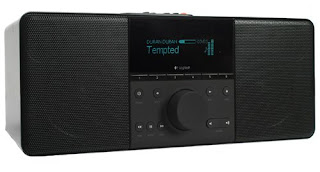 My top choice is the Squeezebox Boom as I really like the fact that it can work standalone as well as part of a multi-player system (i.e. together with other Squeezebox devices and/or compatible software based player running off standard PC based hardware). Moreover, both modes can be centrally and more importantly, remotely controlled via a web-based interface. This means that I can control my players in or out of the house and via any connected device with a web-browser (e.g. my mobile phone)! And to top it off, you can control them either via a locally hosted application (called the SqueezeCenter) or via the internet version hosted by Logitech (called the SqueezeNetwork).
Unfortunately, the Squeezebox Boom was not available locally and almost a year later, it still isn't. In the mean time, my kids have been bugging me relentlessly about having no access to their music in bed. So yesterday, I took the plunge and bought a Squeezebox Boom off ebay Australia for AUD$300 inclusive of local shipping.
Why Australia? Well, for one thing, I am going to get the overseas shipping free thanks to my cousin Yuan who has a friend returning from Australia in a couple of weeks time. And secondly, it is priced cheaper in Australia than the US. So its a no-brainer really.
ETA for my set to reach my hands is 20th May. In the mean time, I need to start figuring out how to get SqueezeCenter working off my DNS-323!
This device will be used mostly as a bedside music player for my kids to access their music collection (yes, they have one!). In addition, I intend to also use it as a portable boombox around the house such as the patio and yard area where I can't access my other media players.
I started looking around for such a device last year and shortlisted a few; the Logictech Squeezebox Boom, Revo Pico WiFi Radio and the Sangean's WFR-20 Wi-Fi Internet Radio.
 My top choice is the Squeezebox Boom as I really like the fact that it can work standalone as well as part of a multi-player system (i.e. together with other Squeezebox devices and/or compatible software based player running off standard PC based hardware). Moreover, both modes can be centrally and more importantly, remotely controlled via a web-based interface. This means that I can control my players in or out of the house and via any connected device with a web-browser (e.g. my mobile phone)! And to top it off, you can control them either via a locally hosted application (called the SqueezeCenter) or via the internet version hosted by Logitech (called the SqueezeNetwork).
Unfortunately, the Squeezebox Boom was not available locally and almost a year later, it still isn't. In the mean time, my kids have been bugging me relentlessly about having no access to their music in bed. So yesterday, I took the plunge and bought a Squeezebox Boom off ebay Australia for AUD$300 inclusive of local shipping.
Why Australia? Well, for one thing, I am going to get the overseas shipping free thanks to my cousin Yuan who has a friend returning from Australia in a couple of weeks time. And secondly, it is priced cheaper in Australia than the US. So its a no-brainer really.
ETA for my set to reach my hands is 20th May. In the mean time, I need to start figuring out how to get SqueezeCenter working off my DNS-323!
Sunday, April 26, 2009
Setting up MySQL on DNS-323
It took me awhile to get round to this (more than a year apparently) but I finally managed to get it done over the weekend. The trigger was because I am going to get a SqueezeBox Boom and will be running the associated controller software called SqueezeCenter (which requires the MySQL database) off the DNS-323.
Compared to the last time I was looking at doing this, the installation and setup is now a breeze, all thanks to fonz for creating a funplug package for it:
Besides using it with SqueezeCenter, I intend to also use it for some web-app projects (e.g. Joomla!). Stay tuned!
Compared to the last time I was looking at doing this, the installation and setup is now a breeze, all thanks to fonz for creating a funplug package for it:
- Download the package from fonz's website
# wget http://www.inreto.de/dns323/fun-plug/0.5/packages/mysql-5.0.67-2.tgz
- Install the package
# funpkg -i mysql-5.0.67-2.tgz
- Setup the MySQL config file using the small version of the included examples (remember that the DNS-323 has limited resources)
# cp -a /ffp/etc/examples/mysql/my-small.cnf /ffp/etc/my.cnf
- Define a storage location for your database files in the config file. For me, I have it on my USB stick as my usage pattern is mostly reads and I want to my HDD to remain in spin down state longer. Add in my.cnf after [mysqld] : datadir = /ffp/var/mysql
- Initialize MySQL
# mysql_install_db
- Now create a database and have fun!
# mysql -u root -p
Enter password: your_root_password
mysql> create database testdb;
mysql> grant all on testdbuser.* to testdb identified by 'your_password';
mysql> flush privileges;
mysql> quit - In case of errors, look up the log found in /ffp/var/mysql/[replace with your hostname].err
Besides using it with SqueezeCenter, I intend to also use it for some web-app projects (e.g. Joomla!). Stay tuned!
Wednesday, April 22, 2009
Microsoft Dynamics pains...
My organization has been using Microsoft Dynamics CRM and AX for almost 2 years now and have gone through one cycle of upgrades for both in that short time. And the reason? well, sad to say, is because both products fall short of what we wanted (and promised by vendor) initially as well as even now. Below are just a few examples of our disappointment:
1) AX Multi-timezone issue - we adopted the solution as a regional platform supporting 12 countries spanning 5 different timezones. Amazingly, the so-called enterprise class AX (previous version 4.0) cannot do this OOTB and even our vendor's promised workaround posed serious limitation to the way we do things. Having said that, the latest version 2009 does solve this problem.
2) CRM performance issue - The client side component of CRM is _extremely_ heavy (lots of small file fragments to load for a page and heavy use of javascripts) causing poor performance over WAN connections, adding substantial traffic to our regional corporate network (To make matters worse, network infrastructure across AP is still relatively poor, patchy and insanely expensive), and lastly requires reasonably powerful client side PC for snappy processing. We resorted to using Citrix to mitigate these issues (moving the load and traffic back to the server side) and even then, we are starting to find this "workaround" getting really expensive (Client license, rapidly growing Citrix farm increased hosting and management costs) as we scale up and throws our ROI right out the window. To top it off, the bloated and leaky (memory-wise) Internet Explorer in Citrix is NOT a good combination!
So in conclusion, IMHO, Microsoft Dynamics (especially CRM) is probably more suitable for small local shops rather than regional platforms with large number of users spread over geographically diverse locations.
1) AX Multi-timezone issue - we adopted the solution as a regional platform supporting 12 countries spanning 5 different timezones. Amazingly, the so-called enterprise class AX (previous version 4.0) cannot do this OOTB and even our vendor's promised workaround posed serious limitation to the way we do things. Having said that, the latest version 2009 does solve this problem.
2) CRM performance issue - The client side component of CRM is _extremely_ heavy (lots of small file fragments to load for a page and heavy use of javascripts) causing poor performance over WAN connections, adding substantial traffic to our regional corporate network (To make matters worse, network infrastructure across AP is still relatively poor, patchy and insanely expensive), and lastly requires reasonably powerful client side PC for snappy processing. We resorted to using Citrix to mitigate these issues (moving the load and traffic back to the server side) and even then, we are starting to find this "workaround" getting really expensive (Client license, rapidly growing Citrix farm increased hosting and management costs) as we scale up and throws our ROI right out the window. To top it off, the bloated and leaky (memory-wise) Internet Explorer in Citrix is NOT a good combination!
So in conclusion, IMHO, Microsoft Dynamics (especially CRM) is probably more suitable for small local shops rather than regional platforms with large number of users spread over geographically diverse locations.
Monday, April 20, 2009

Saturday, April 18, 2009
How to send email from scripts running on DNS-323
In the full installation of ffp 0.5, two email related utilities are installed by default. They are
Well, as it turned out, it wasn't that hard to get it up and running anyway which might explain the lack of documentation. But for the uninitiated, all you need is to create a config file called esmtprc in your /ffp/etc folder and input your mail provider details there. To learn more about how to configure the esmtprc file, take a look at this sample.
Then to send mail, use the mailx command syntax like this
> cat /bs/some_file.txt mailx -s "the email subject line" -r sender@somewhere.com recepient@somewhere.com
which sends the content of the file "some_file.txt" as the body of the message, or to send it as an attachment, use this
>mailx -s "this is your subject line" -a /bs/some_file.txt -r sender@somewhere.com recepient@somewhere.com
To use gmail as your mail provider, you may want to check out this forum post.
- mailx - a Mail User Agent which allows you to send and receive mail using command line parameters, and
- esmtp - a Mail Transfer Agent which transfer mail from one computer to another
Well, as it turned out, it wasn't that hard to get it up and running anyway which might explain the lack of documentation. But for the uninitiated, all you need is to create a config file called esmtprc in your /ffp/etc folder and input your mail provider details there. To learn more about how to configure the esmtprc file, take a look at this sample.
Then to send mail, use the mailx command syntax like this
> cat /bs/some_file.txt mailx -s "the email subject line" -r sender@somewhere.com recepient@somewhere.com
which sends the content of the file "some_file.txt" as the body of the message, or to send it as an attachment, use this
>mailx -s "this is your subject line" -a /bs/some_file.txt -r sender@somewhere.com recepient@somewhere.com
To use gmail as your mail provider, you may want to check out this forum post.
Thursday, April 16, 2009
How much does it cost to run a HomePlugAV network?
This question popped into my head today when I was contemplating leaving my HomePlugs on 24/7 instead of having to run around the house turning them on/off as required. So here's what I figured out:
However, compare this with a 8 port LAN switch such as the Netgear GS108 whose paper specs say a maximum power consumption of 4.92W which works out to be just $7.70 a year for eight devices!
Hmm.. Looks like I will still be insisting that a wired Ethernet network infrastructure be one of the key requirements in my next house!
- Power consumption of the Aztech HomePlugAV HL109E is 4.5W (based on paper specs)
- Running it all month will give consume 3.285kWh (4.5W x 730hr /1000)
- At the current electricity price of $0.1803/kWh, monthly electricity bill will increase by $0.59
- Over the course of a year, I will need to spend $7 to maintain 1 point.
- Assuming I have 6 points in my house, that will be $42 a year!
However, compare this with a 8 port LAN switch such as the Netgear GS108 whose paper specs say a maximum power consumption of 4.92W which works out to be just $7.70 a year for eight devices!
Hmm.. Looks like I will still be insisting that a wired Ethernet network infrastructure be one of the key requirements in my next house!
Subscribe to:
Posts (Atom)